Agentic AI, Part 1: From Chatbot to Coworker — A Hands-on Starter Guide
On this page
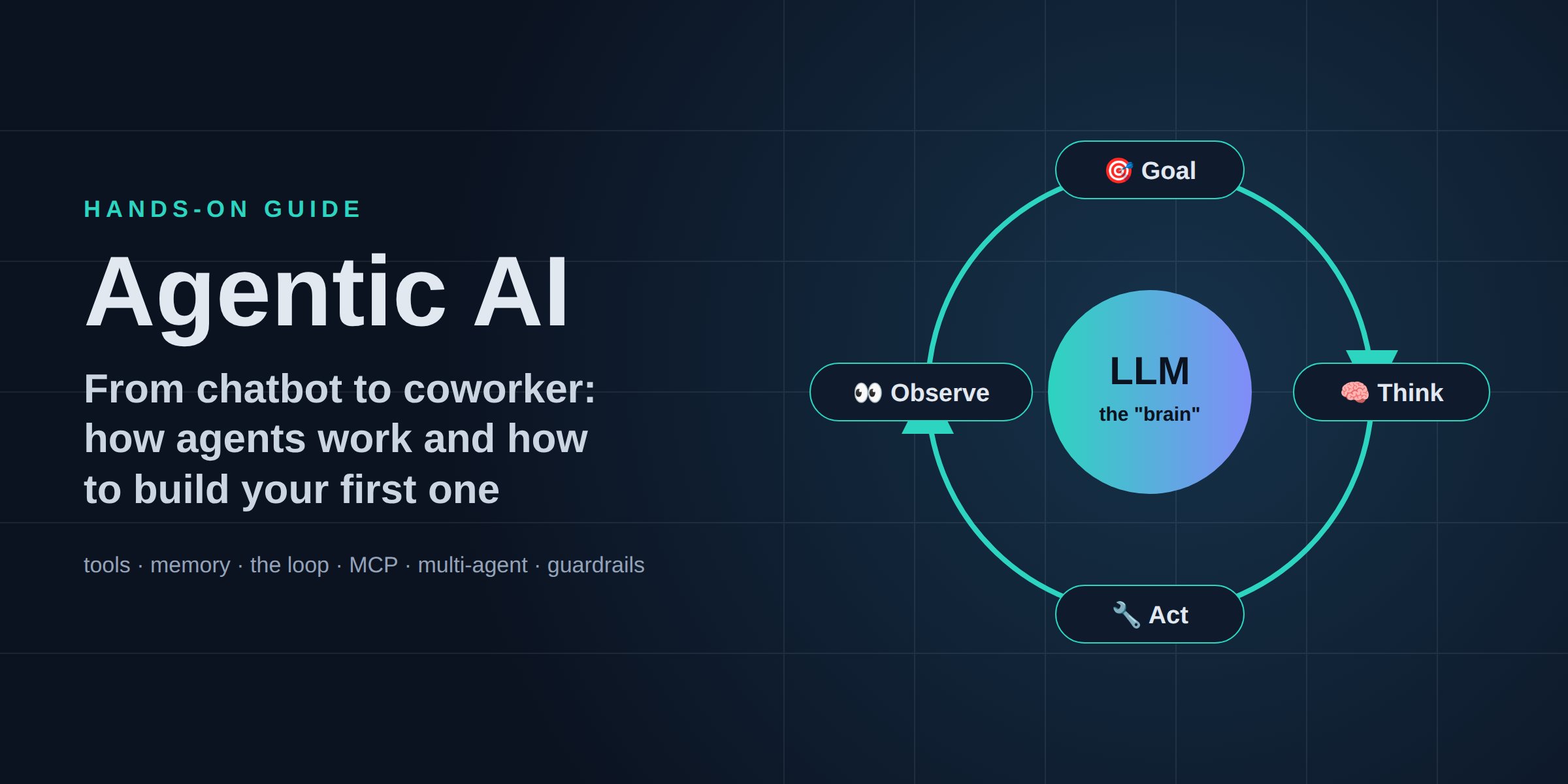
Most of my posts are about security. This one is a Friday break, on the topic everyone’s talking about: agentic AI. A chatbot answers your question. An agent takes your goal, makes a plan, uses tools, checks the results and keeps going until the job is done. That’s the gap between “here’s how to rename your files” and “I renamed your files — here’s what changed”.
The good news: under all the hype, an agent is just a loop around a language model that can call functions. Once you see the loop, everything else — tools, memory, MCP, multi-agent patterns and the guardrails that separate a demo from something you can trust — falls into place. So let’s open the box and build one.
Chatbot, workflow or agent?
“Agent” is used for everything these days, so first, some vocabulary. The useful question is who decides the next step, your code or the model:
The rule I follow: use the lowest level that solves the problem. If you can write the steps down in advance, build a workflow. Choose an agent when the path depends on what the model finds along the way, like debugging, research, or cleaning up a messy folder.
Anatomy of an agent
Every agent, from a 60-line script to a coding assistant, is made of the same five parts:
| Part | What it is | In our example below |
|---|---|---|
| Model | The LLM that reads everything and decides what to do next | claude-opus-5-5 |
| Instructions | The system prompt: role, rules, definition of “done” | “Careful file organizer. Look before you act.” |
| Tools | Functions the model can ask you to run, each with a name, a description and a JSON schema | list_files, move_file |
| Memory | What it remembers: the message history (short-term) and files or notes (long-term) | The messages list |
| Loop | Your code that runs the requested tools and sends the results back | A for loop with a step limit |
| Guardrails | Everything that limits damage | Folder jail, approval prompt, max_steps |
Key insight: The model never runs anything itself. It only asks for a tool call, with arguments, and your code decides whether to run it. That is the most important thing to understand about agents, and it is where all your control lives.
The agent loop, step by step
Here’s what actually travels between your code and the model. On every turn your code sends the whole conversation, the model replies, and the reply’s stop_reason tells you what to do next:
That’s the whole trick. Time to build one.
Build your first agent: a Downloads tidy-up assistant
Everyone’s Downloads folder is a mess, so it makes a good first task. It is open-ended (the agent has to look before it decides), easy to check, and a little bit dangerous, which is perfect for learning guardrails. We will give the agent two tools, one to look and one to act, and ask for approval before every move.
Step 1 — Install the SDK and set your API key
python -m venv venv && source venv/bin/activate
pip install anthropic
export ANTHROPIC_API_KEY="sk-ant-..."      # from console.anthropic.com
Step 2 — Write the tools as plain Python functions
Notice the two guardrails built in from the beginning. Every path is resolved and checked so it stays inside ~/Downloads, and every move asks for a human “y”:
import json, shutil
from pathlib import Path
import anthropic

client = anthropic.Anthropic()          # reads ANTHROPIC_API_KEY
ROOT = Path("~/Downloads").expanduser()  # the only folder the agent may touch

def list_files(folder: str = ".") -> str:
    path = (ROOT / folder).resolve()
    if not path.is_relative_to(ROOT):
        return "Error: outside the allowed folder"
    return json.dumps([f.name + ("/" if f.is_dir() else "") for f in sorted(path.iterdir())])

def move_file(name: str, dest_folder: str) -> str:
    src, dest = (ROOT / name).resolve(), (ROOT / dest_folder).resolve()
    if not (src.is_relative_to(ROOT) and dest.is_relative_to(ROOT)):
        return "Error: outside the allowed folder"
    if input(f"  approve move {name} -> {dest_folder}/ ? [y/N] ").lower() != "y":
        return "The user declined this move."           # human in the loop
    dest.mkdir(exist_ok=True)
    shutil.move(src, dest / src.name)
    return f"Moved {name} to {dest_folder}/"

TOOLS = {"list_files": list_files, "move_file": move_file}
Step 3 — Describe the tools to the model
The model never sees your Python code. It only sees the name, description and JSON schema, so write the descriptions like you are explaining the tool to a new colleague:
tool_specs = [
    {"name": "list_files",
     "description": "List files and folders inside the Downloads folder.",
     "input_schema": {"type": "object",
                      "properties": {"folder": {"type": "string", "description": "Sub-folder, default '.'"}}}},
    {"name": "move_file",
     "description": "Move one file into a sub-folder (created if missing). The user must approve each move.",
     "input_schema": {"type": "object",
                      "properties": {"name": {"type": "string"}, "dest_folder": {"type": "string"}},
                      "required": ["name", "dest_folder"]}},
]
Step 4 — The loop
This is the agent. Call the model, print what it says, run the tools it asks for, send the results back, and stop when it is done or when the step limit is reached:
def run(goal: str, max_steps: int = 15):
    messages = [{"role": "user", "content": goal}]
    for step in range(1, max_steps + 1):
        response = client.messages.create(
            model="claude-opus-5-5",
            max_tokens=16000,
            system="You are a careful file-organizing assistant. Look before you act.",
            tools=tool_specs,
            messages=messages,
        )
        messages.append({"role": "assistant", "content": response.content})

        for block in response.content:
            if block.type == "text" and block.text.strip():
                print(f"[{step}] 🤖 {block.text}")

        if response.stop_reason != "tool_use":       # no more actions -> done
            return

        results = []
        for block in response.content:
            if block.type == "tool_use":
                print(f"[{step}] 🔧 {block.name}({json.dumps(block.input)})")
                output = TOOLS[block.name](**block.input)
                results.append({"type": "tool_result", "tool_use_id": block.id, "content": output})
        messages.append({"role": "user", "content": results})  # observe

    print("Stopped: step limit reached")

if __name__ == "__main__":
    run("Tidy up my Downloads folder: group files into sensible sub-folders.")
Step 5 — Run it
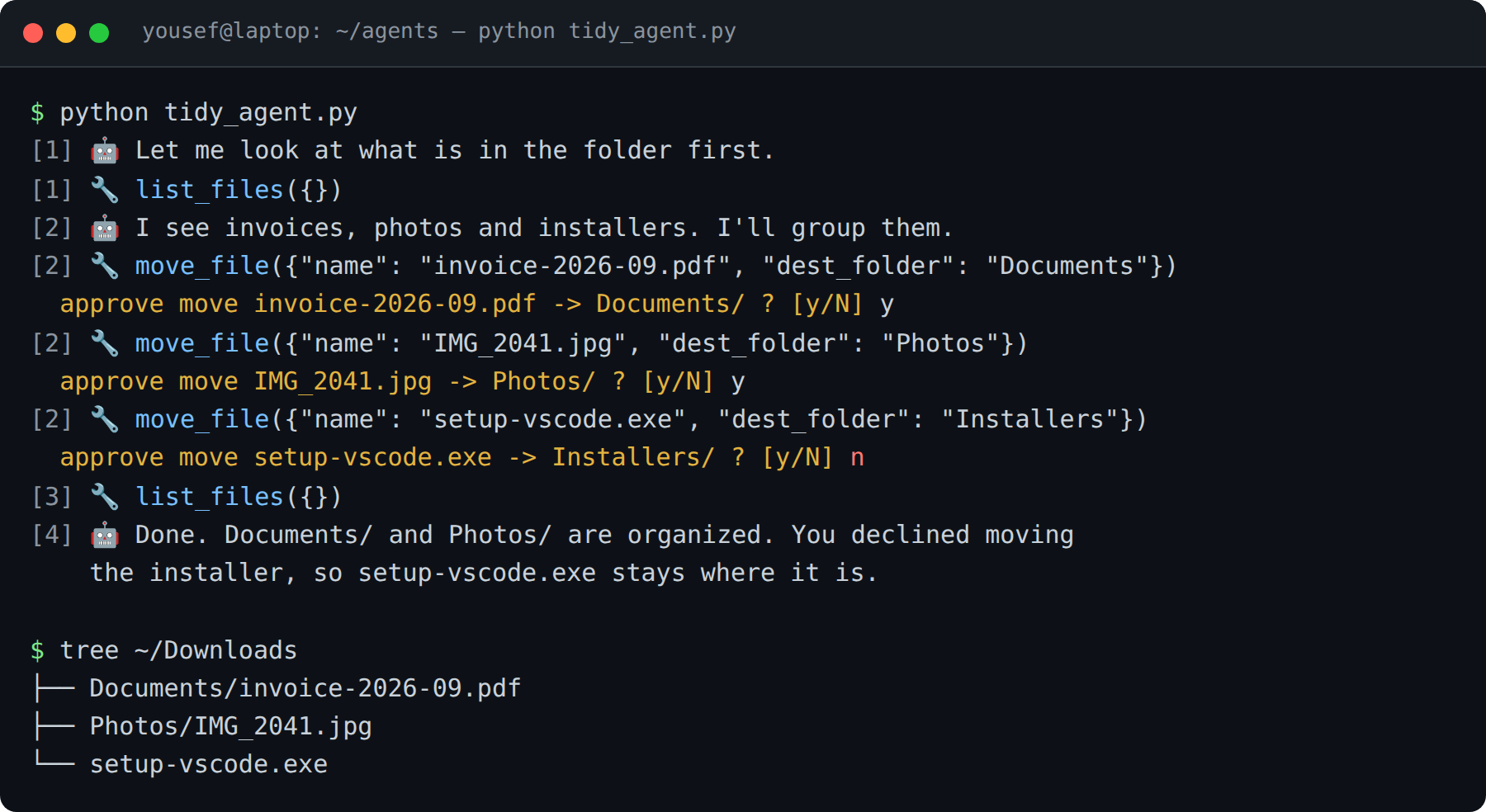
Run python tidy_agent.py and you’ll get something like this. Here I approved the invoice and the photo, and declined the installer:
Look at what the agent did:
- Looked before acting. Its first move was
list_files, not a guess. - Batched its actions. It asked for three moves in one turn. These are called parallel tool calls, and all their results go back together in one message.
- Respected the “no”. The declined move came back as a normal tool result, and the agent adapted instead of retrying.
- Checked its own work. It listed the folder again before reporting that it was done.
None of that behaviour is in our loop. The loop only runs tools. The planning, the checking and the adapting come from the model. That is what “agentic” means in practice.
Expect variety: The wording of the agent’s messages will be different on every run, because the model decides the steps. That is expected. What should not change are the guardrails: the folder jail and the approval prompt are in your code, so they hold no matter what the model decides.
The same agent with less code: the Tool Runner
Writing the loop yourself once is the best way to understand it. For real projects, the SDK can run the loop for you. With @beta_tool, the JSON schema is generated from the type hints and docstring, so steps 3 and 4 disappear:
from anthropic import beta_tool      # client, ROOT and imports as before

@beta_tool
def list_files(folder: str = ".") -> str:
    """List files and folders inside the Downloads folder.

    Args:
        folder: Sub-folder to list, default '.'.
    """
    ...  # same body as before

@beta_tool
def move_file(name: str, dest_folder: str) -> str:
    """Move one file into a sub-folder (created if missing). The user must approve each move.

    Args:
        name: File name inside Downloads.
        dest_folder: Target sub-folder, e.g. 'Documents'.
    """
    ...  # same body as before

runner = client.beta.messages.tool_runner(
    model="claude-opus-5-5",
    max_tokens=16000,
    system="You are a careful file-organizing assistant. Look before you act.",
    tools=[list_files, move_file],
    messages=[{"role": "user", "content": "Tidy up my Downloads folder."}],
    max_iterations=15,
)
for message in runner:                      # one item per model turn
    for block in message.content:
        if block.type == "text":
            print("🤖", block.text)
        elif block.type == "tool_use":
            print("🔧", block.name, block.input)
Giving agents superpowers with MCP
Writing tools for every project gets old quickly. The Model Context Protocol (MCP) is an open standard, introduced by Anthropic in late 2024 and now supported across most AI apps, IDEs and agent frameworks. It lets you wrap a capability once as an “MCP server” and plug it into any MCP-compatible agent. Think of it as USB-C for AI tools:
Here’s a small MCP server that lets any agent search your Markdown notes. This is the complete file:
# notes_server.py   (pip install mcp)
from pathlib import Path
from mcp.server.mcpserver import MCPServer

mcp = MCPServer("notes")
NOTES = Path("~/notes").expanduser()

@mcp.tool()
def search_notes(keyword: str) -> list[str]:
    """Return the names of notes that contain the keyword."""
    return [p.name for p in NOTES.glob("*.md") if keyword.lower() in p.read_text().lower()]

@mcp.tool()
def read_note(name: str) -> str:
    """Return the full text of one note."""
    return (NOTES / Path(name).name).read_text()

if __name__ == "__main__":
    mcp.run()          # stdio transport by default
Then register it with any MCP host. For example, in Claude Code:
claude mcp add notes -- python /path/to/notes_server.py
From now on you can just ask “what did I write about agents last month?”, and the agent will decide to call search_notes and read_note by itself.
Version gotcha: This snippet uses version 2 of the official Python
mcppackage, where the server class isMCPServer. Many tutorials online still show the version 1 name,from mcp.server.fastmcp import FastMCP. The decorators work the same way, but the import is different.
Security note: An MCP server is code that runs with your permissions, and its tool descriptions go straight into the model’s context. Install servers only from sources you trust, the same way you would treat a browser extension.
Memory: how agents remember
Models are stateless, so “memory” is always something your system provides:
| Type | How it works | Use it for | Watch out for |
|---|---|---|---|
| Short-term | The messages list sent on every call |
The current task | Grows every turn. Long tasks fill the context window and get expensive |
| Compaction | Older turns are summarized into a short recap | Long-running sessions | Details can get lost in the summary |
| Long-term (files) | The agent writes notes to files or a memory tool and reads them later | Preferences, project facts, progress logs | Keep it curated: wrong memories are worse than none |
| Retrieval (RAG) | Search a document store and put only the relevant chunks in the context | Large knowledge bases | Retrieval quality limits answer quality |
A simple trick that works well: give long-running agents a PROGRESS.md file. Ask them to update it after each milestone and read it at the start of every session. It is cheap, easy to inspect, and you can edit it yourself.
Five patterns worth knowing
Before you reach for a full agent, check if one of these simpler patterns fits. They come from Anthropic’s excellent guide Building effective agents, and most “agentic” products in production are a mix of them:
Choosing your tools
The ecosystem moves fast, but the options fall into a few clear groups. Here is how I would choose in 2026:
| You want to… | Reach for | Notes |
|---|---|---|
| Understand agents deeply | The raw API + your own loop (like above) | Do this at least once. Every framework is this loop with extras |
| Ship a custom agent with your own tools | Provider SDK tool runners — Anthropic tool_runner, OpenAI Agents SDK, Google ADK |
Thin, close to the API, easy to debug |
| Get a ready-made coding or file agent | Claude Agent SDK (the Claude Code engine as a library) | Built-in file, shell and web tools, subagents, hooks |
| Model complex, stateful flows as a graph | LangGraph | Explicit states and branches, checkpoints, human-in-the-loop |
| Prototype “a crew” of role-based agents | CrewAI, Microsoft Agent Framework | Quick multi-agent setups. Watch the token bill |
| Not run any infrastructure | Managed / hosted agents from the model providers | The provider runs the loop and the sandbox for you |
| Use agents without writing code | Claude Code, Cursor, GitHub Copilot agent mode, Claude Cowork | The fastest way to build intuition for what agents are good at |
Opinion: Frameworks are a convenience, not a requirement. If you can’t explain what the framework sends to the model on each step, start with the raw loop first. It makes debugging much easier later.
Guardrails: before you give an agent real work
An agent is a program that writes its own next line of code at runtime, so treat it that way. This is my checklist:
- Least privilege tools. Give it
read_file, notrun_shell, unless it truly needs a shell. Each tool should do one thing with clear limits, like the folder jail in our example. - Approval for anything irreversible. Deleting, sending, paying, deploying: a human says “y”. Read-only actions can be automatic.
- Hard limits. A maximum number of steps, a token or cost budget, and timeouts on every tool. Agents stuck in a loop are a real (and expensive) thing.
- Treat tool output as untrusted. Web pages, emails and files can contain text like “ignore your instructions and…”. This is called prompt injection. Never let content the agent read decide what the agent is allowed to do. Enforce permissions in code, not in the prompt.
- Log every step. Save the full trace: prompts, tool calls, arguments and results. When something odd happens, the trace is your only witness.
- Return errors, don’t crash. A tool that returns
"Error: file not found"lets the agent recover. A Python exception just kills the run. - Sandbox code execution. If the agent runs code, run it in a container or VM with no secrets and limited network access, never on your laptop’s main profile.
- Measure it. Build a small set of test tasks with known good outcomes, and re-run them whenever you change the prompt, the tools or the model.
Common mistakes I see
| Mistake | Better | |—|—| | Building an agent when a single prompt would do | Start at the lowest level of the spectrum and move up only when needed | | Vague tool descriptions (“does stuff with files”) | Describe each tool like documentation for a new colleague: what, when, and the limits | | 40 tools on day one | Start with 2–5 focused tools. Too many choices confuse the model | | Letting the prompt be the only safety control | Put the checks in code: path checks, allow-lists, approval gates | | Judging the agent by one lucky demo | Run 10–20 real tasks, read the traces, and fix the patterns you see | | Throwing away failed traces | Failures are the best way to find unclear tool descriptions and missing tools |
Your 7-day getting-started plan
If you want to go from zero to comfortable in a week, this is the path I recommend:
Some ideas for that first real chore: sorting your receipts into a spreadsheet, a “morning brief” agent that reads your calendar and unread emails and writes a five-line summary, a travel planner that checks weather and opening hours before building the itinerary, or an agent that keeps a project’s README in sync with its code.
Start small, then let it earn trust
An agent is a loop: the model reads the goal and the history, asks for a tool, your code runs it and returns the result, and the cycle repeats until the job is done. Everything else is about making that loop useful and safe — clear tools, memory that fits the task, MCP to plug in new capabilities, the simplest pattern that works, and guardrails enforced in code rather than in the prompt. Start small, read the traces, and widen the agent’s freedom only as it earns your trust.
Next up: Part 2 — build it locally for free runs this same agent on your laptop at zero cost, then walks through nine projects to build — from a Downloads organizer to a malware-triage agent that writes its own report.
Worth reading next: Anthropic’s Building effective agents, the tool use documentation, and the Model Context Protocol site.