Getting Started with the Vue 3 Composition API
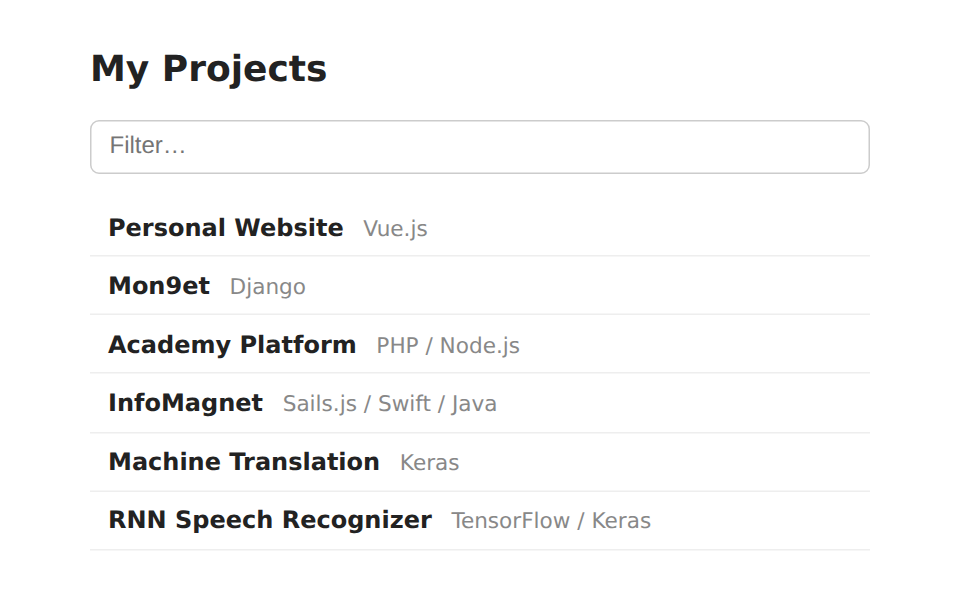
My portfolio site runs on Vue.js, and Vue is the frontend framework I reach for most in my web work. Vue 3 — and especially <script setup>, which became stable in Vue 3.2 this month — changed how I write components.
The best way to show it is to build something. The small app in the picture above lists my projects with a live filter, and clicking one tells the parent which project was selected. Each piece maps back to the Options API, so nothing feels like magic.
Create the project
Create a new Vue 3 project with Vite:
npm create vite@latest vue-demo -- --template vue
cd vue-demo
npm install
npm run dev
For the data I used a simple JSON file in public/api/items.json, so we can focus on Vue and not on a backend:
[
  {"id": 1, "name": "Personal Website", "tech": "Vue.js"},
  {"id": 2, "name": "Mon9et", "tech": "Django"},
  {"id": 3, "name": "Academy Platform", "tech": "PHP / Node.js"}
]
How data flows between components
Before writing the component, it helps to understand the rule that every Vue app follows:
Props go down, events go up, and shared state lives on the side. If you find yourself passing a prop through three components that don’t use it, it belongs in a store or a composable.
Reactivity: ref and reactive
Everything in the Composition API starts with reactive values:
import { ref, reactive, computed, watch } from 'vue'

const count = ref(0)                                      // primitives -> ref, use .value in JS
const user  = reactive({ name: 'Yousef', role: 'dev' })   // objects -> reactive, no .value

const doubled = computed(() => count.value * 2)           // cached, recalculated on change
watch(count, (now, before) => console.log(before, '→', now))
| Use | When |
|---|---|
ref() |
Primitives, or any value you may replace completely |
reactive() |
An object you change in place — don’t destructure it, you lose reactivity (use toRefs) |
computed() |
Values derived from other values. No side effects inside |
watch() |
Side effects when something changes (API calls, localStorage) |
A composable for fetching data
Time for the first composable — a plain function that contains reactive logic and can be reused by any component. This is the main reason to use the Composition API: it replaces mixins without their name collisions. Create src/composables/useFetch.js:
import { ref } from 'vue'

export function useFetch(url) {
  const data = ref(null), error = ref(null), loading = ref(true)
  fetch(url)
    .then(r => r.ok ? r.json() : Promise.reject(r.statusText))
    .then(d => (data.value = d))
    .catch(e => (error.value = e))
    .finally(() => (loading.value = false))
  return { data, error, loading }
}
The component
Now the component itself, src/components/ProjectList.vue. It receives a title prop, loads the data with our composable, filters it with a computed value, and emits a selected event when an item is clicked:
<script setup>
import { ref, computed } from 'vue'
import { useFetch } from '../composables/useFetch'

const props = defineProps({ title: { type: String, required: true } })
const emit  = defineEmits(['selected'])

const { data: items, loading } = useFetch('/api/items.json')
const filter = ref('')

const visible = computed(() =>
  (items.value || []).filter(i => i.name.toLowerCase().includes(filter.value.toLowerCase()))
)
</script>

<template>
  <h2>{{ props.title }}</h2>
  <input v-model="filter" placeholder="Filter…" />
  <p v-if="loading">Loading…</p>
  <ul v-else>
    <li v-for="item in visible" :key="item.id" @click="emit('selected', item)">
      <strong>{{ item.name }}</strong> <span class="tech">{{ item.tech }}</span>
    </li>
  </ul>
  <p v-if="!loading && !visible.length">Nothing matches.</p>
</template>
With <script setup>, everything declared at the top level is automatically available in the template. There is no return { ... } and no export default.
And the parent, src/App.vue, listens to the event:
<script setup>
import { ref } from 'vue'
import ProjectList from './components/ProjectList.vue'
const picked = ref(null)
</script>

<template>
  <ProjectList title="My Projects" @selected="p => (picked = p)" />
  <p v-if="picked">Selected: <strong>{{ picked.name }}</strong></p>
</template>
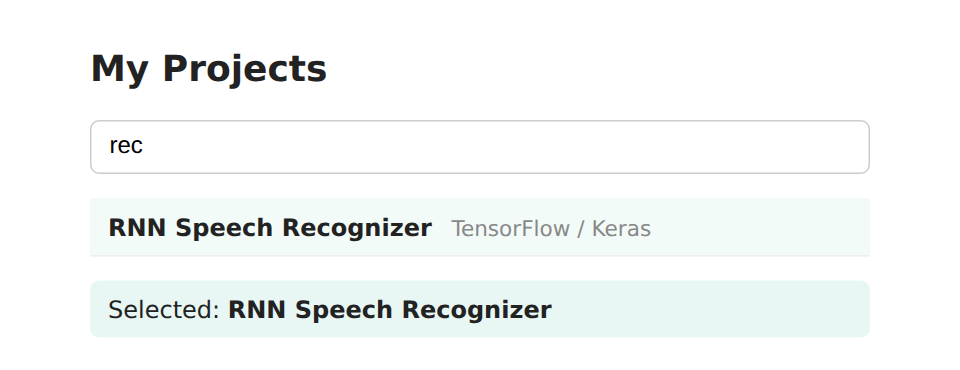
Once you save, the app shows the full list as in the first screenshot. Type “rec” in the filter and click the result — the list updates on every key press, and the parent receives the selected item through the event:
Options API → Composition API
If you already know Vue 2, this table maps what you know to the new syntax:
| Options API | Composition API |
|---|---|
data() { return { n: 0 } } |
const n = ref(0) |
computed: { x() {} } |
const x = computed(() => …) |
methods: { go() {} } |
function go() {} |
watch: { n(v) {} } |
watch(n, v => …) |
mounted() {} |
onMounted(() => {}) |
this.$emit('e') |
const emit = defineEmits(['e']); emit('e') |
props: ['title'] |
const props = defineProps(['title']) |
Common mistakes: Five common mistakes: destructuring a
reactive()object (usetoRefs), using the array index as:key, changing a prop inside the child (emit an event instead), puttingv-ifandv-foron the same element, and forgetting.valuein the script — templates unwrap refs automatically, JavaScript doesn’t.
Organized by what it does
The Composition API organizes a component by what it does instead of by option type: reactive values with ref and reactive, derived values with computed, communication through props and events, and reusable logic in composables. The app above uses all of them in under 50 lines. The official Vue 3 documentation goes deeper.